
Custom alerts: your own live conditions, in football, tennis and basketball
A custom alert is a live alert you write yourself: you pick the conditions, BetClutch watches every match of your leagues and notifies you the moment they are all met. Ten shots on target and still 0-0 at the 30th minute, four corners in the last ten minutes of a tight match, a big favorite broken in the first set: you describe the situation, the app does the watching. Football, tennis and basketball.
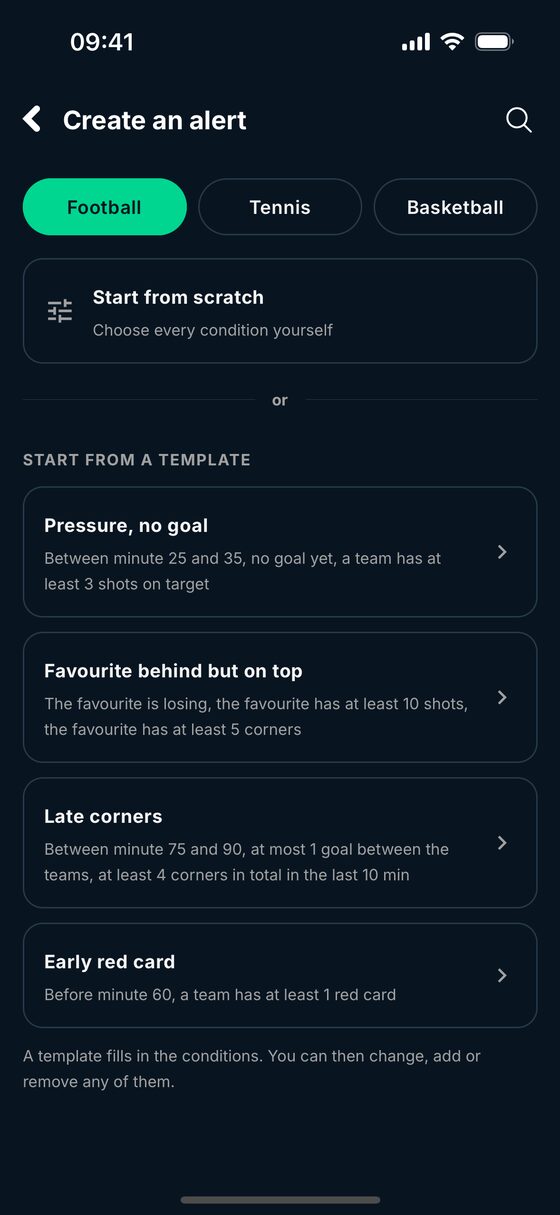
Start from a template
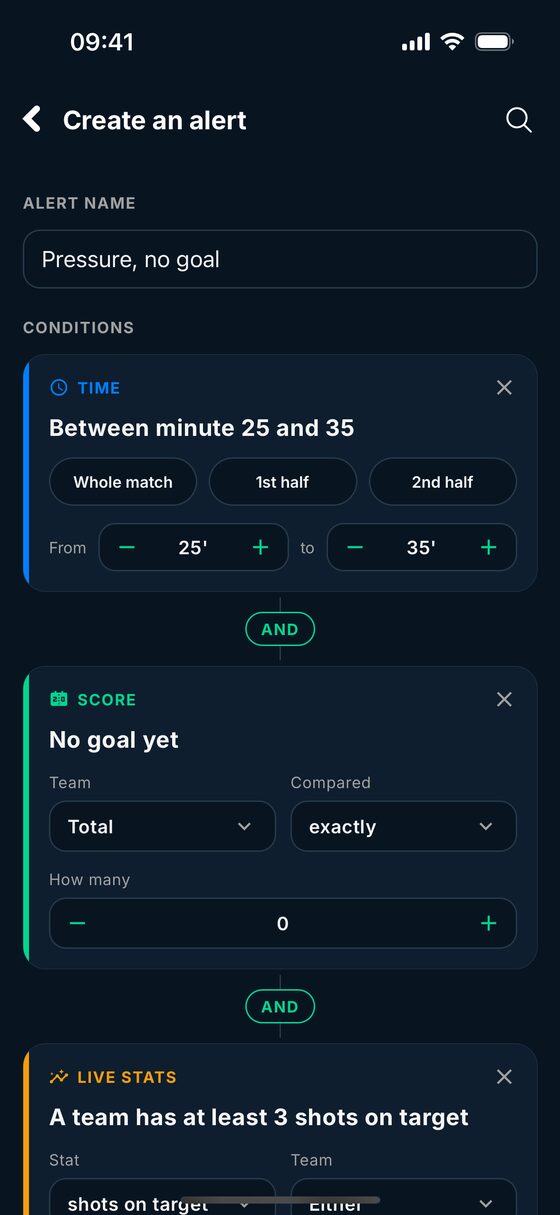
You can start from scratch or from one of the app's templates, then change, add or remove any condition.
Football
- Pressure, no goal: between the 25th and 35th minute, still no goal, and one team with at least 3 shots on target.
- Favorite behind but on top: the favorite is losing, with at least 10 shots and 5 corners.
- Late corners: from the 75th minute, one goal or less between the teams, and at least 4 corners in the last 10 minutes.
- Early red card: a red card for either team before the 60th minute.
Tennis
- Favorite a set down and broken: the favorite has lost a set and is a break down in the set being played.
- Double break in the deciding set: a favorite priced at 1.50 or less before the match is two breaks down in the deciding set.
- Big favorite broken: a favorite priced at 1.30 or less is broken in the first set.
- Favorite loses the 1st set: a favorite priced at 1.40 or less goes into the second set a set down.
Basketball
- Favorite behind at half-time: the favorite trails by 8 points or more at the break.
- Favorite behind after Q1: the favorite trails by 6 points or more after the first quarter.
- Close finish: three points or less between the teams in the last 3 minutes of the 4th quarter.
Every condition you can use
An alert holds up to 8 conditions, which must all be true at the same moment.
Football: the minute (between two minutes, or before one), the first or second half, the score for the favorite, the outsider, the home or the away team, the number of goals, the goal difference, a close score, and the live stats of one team, both or the match: shots, shots on target, corners, attacks, dangerous attacks, possession, yellow and red cards, xG, over the whole match or over the last minutes. Odds: the favorite's odds before the match, a team's live odds, or the live odds of another market.
Tennis: the score in sets, the set being played or the deciding set, the games difference in the set, breaks ahead or behind, a tie-break in progress, a player serving for the set or for the match. Five-set conditions are only offered where they exist (men's Grand Slams).
Basketball: the end of the 1st or 3rd quarter, half-time, the last minutes of the 4th quarter, overtime, the points difference and the total points.
Context: you can add what a team did in its previous matches (its last 5 or 10, or the whole season, at home or away): wins, unbeaten runs, both teams scoring, over 2.5 goals, clean sheets, a goal in the first half. Context is read once a day on matches already played, and never fires an alert on its own: it comes with a live condition.
The app checks what you write: it warns you when two conditions can never be true together, or when no condition depends on what happens in the match.
How often would it have fired?
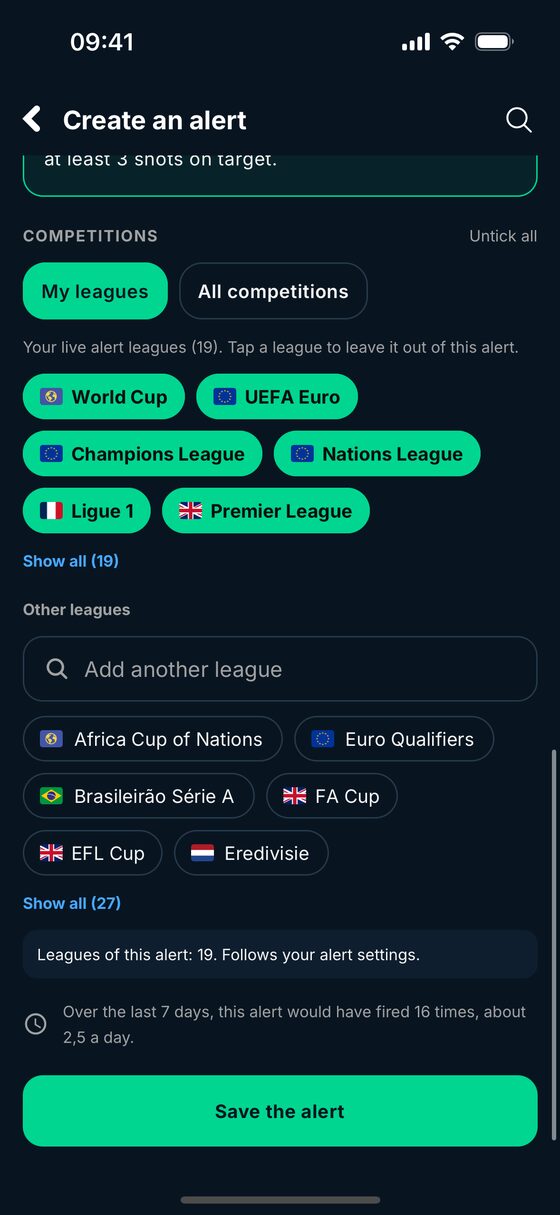
Before you save, BetClutch replays your alert on the finished matches of the last 7 days in the competitions you chose, and tells you how many times it would have fired, and about how many times a day. Too many? Add a condition. Never? Loosen one. You know what to expect before the first notification.
Your leagues, your hours
Each alert watches the leagues of your live alerts, every competition BetClutch follows (more than 1,000), a selection of your own, or a single match. It follows the alert hours you set in the app, like the other alerts.
The history of each alert
Open an alert to see where it fired over the last 7 days: the match, the moment, and the final score once the match is over. You can switch an alert off, change it or delete it at any time.
Share an alert
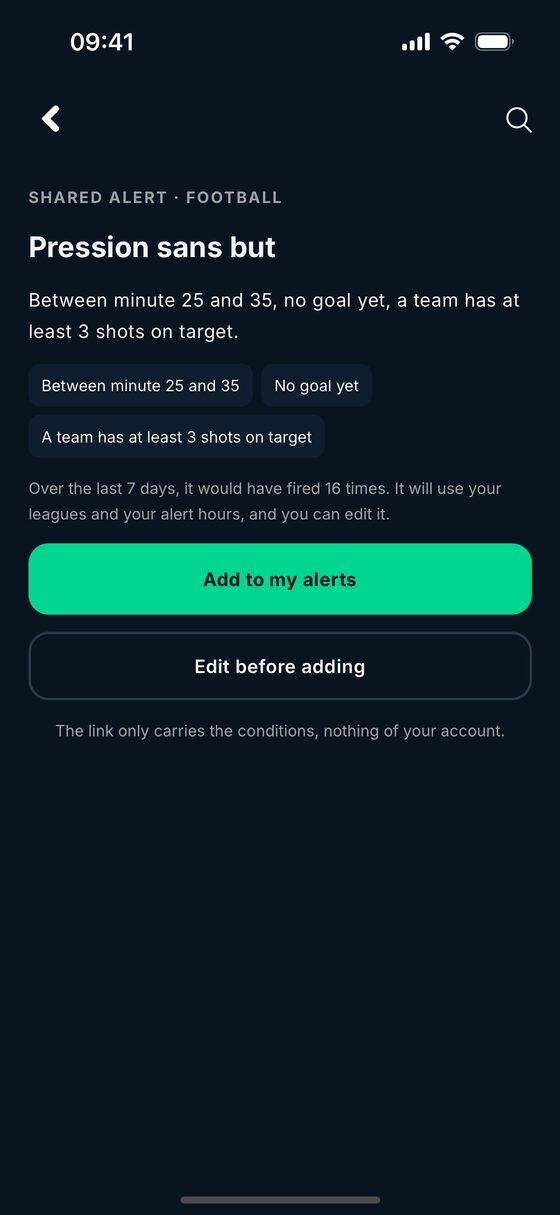
Each alert has its own link, betclutch.app/a/…, to send to a friend or a group. Whoever opens it sees the alert's name and how often it would have fired over the last 7 days, then adds it to their own alerts, with their own leagues and hours. The link only carries the conditions, nothing of your account.
One match only
From a match page, you can also set an alert for that match alone, in one tap ("the favorite is losing", "still 0-0 at the 60th minute", "red card", "the favorite loses their serve", "close finish"...) or with your own conditions. It is deleted when the match ends.
What BetClutch does not do
- No predictions. An alert tells you your conditions are met, not how the match will end.
- No bets. BetClutch is not a bookmaker and does not place bets for you.
- No AI. An alert fires on the score, the live stats and the odds, with the rules you wrote.
Custom alerts are part of Pro, with a 10-day free trial and no charge when it ends. Without an account, BetClutch sends you up to 3 favorite losing alerts and 1 big odds move a day, for free. The app is available on iPhone and Android. It is an information and analysis app for adults only. Bet responsibly.
Questions about custom alerts
What can I set in a custom alert?
Up to 8 conditions that must all be true at the same time. In football: the minute or the half, the score, the goals, the goal difference, live stats (shots, shots on target, corners, attacks, dangerous attacks, possession, cards, xG), over the whole match or over the last minutes, the favorite's odds before the match and the live odds. In tennis: the set score, the set being played, the games difference, breaks, a tie-break, a player serving for the set or the match. In basketball: the end of a quarter, half-time, the last minutes, the points difference and the total points.
How do I know whether an alert will fire too often?
Before you save it, BetClutch replays it on the finished matches of the last 7 days in your competitions and tells you how many times it would have fired, and about how many times a day. If that is too often, add a condition. A few conditions cannot be replayed on past matches: the app then says so.
Which competitions does an alert watch?
The leagues of your live alerts, every competition BetClutch follows (more than 1,000), a selection of your own, or a single match. The alert also follows your alert hours.
Can I share an alert?
Yes. Each alert has a share link (betclutch.app/a/…). Your friend opens it and adds the alert to their own alerts, with their own leagues and hours, and can change it. The link only carries the conditions, nothing of your account.
Are custom alerts free?
Custom alerts are part of Pro. Pro comes with a 10-day free trial, with no charge when it ends. Without an account, BetClutch still sends you up to 3 favorite losing alerts and 1 big odds move a day for free.
Does BetClutch tell me what to bet?
No. BetClutch is not a bookmaker, takes no bets and gives no predictions. A custom alert tells you that your conditions are met in a match, with the score and the odds at that moment.

